
 MBox Viewer Portable has been released by PortableApps.com. MBox Viewer is a simple but powerful viewer to view mbox files. It's packaged as a portable app so you download on the go and it's in PortableApps.com Format so it can easily integrate with the PortableApps.com Platform. It's released as freeware for personal and business use.
Update automatically or install from the portable app store in the PortableApps.com Platform.
Features
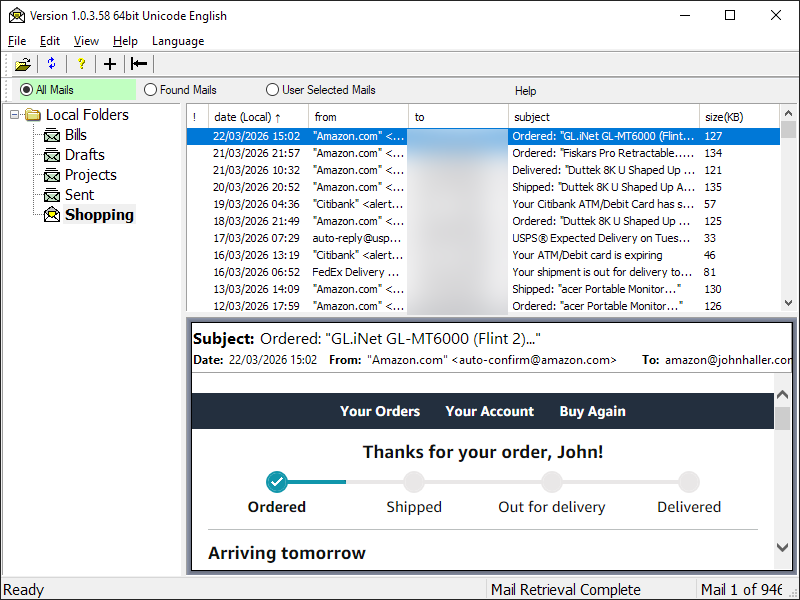 MBox Viewer is a simple but powerful viewer to view mbox files such as Thunderbird Archives, Google mail archives, simple Eml files and Outlook msg files. Features include:
- large file support > 4Gb
- fast parsing of mbox
- quick access to attachments
- preview picture attachments
- export of all attachments
- export of single mail in Eml
- export of all mails to separate Eml files
- print all or multiple selected mails to CSV or Text or HTML or PDF file
- print single mail to Text or HTML or PDF file or to send to PDF printer
- group all related mails as conversations in the summary window
- print related mails/mail group to Text or HTML or PDF or CSV files or send to PDF printer
- open a single or multiple selected mails or group of related mails in external browser
- sort emails by date, from, to, subject and conversation columns
- find user defined text in the message and highlight all occurrences
- search mails by user defined date range and text in the subject, sender, recipient, cc, bcc, message text, attachments text and attachment names
- search for mails that didn't match the search criteria specified by a user
- support for header fields and body text encoded with any Windows supported character sets/page codes
- ability to compose mail list from single or multiple search results and archiving if desired
- ability to set Message Window position to Bottom, Right or Left
- ability to merge/concatenate multiple archive files and remove duplicate mails
- ability to customize the background color of key display panes
- ability to customize the HTML/PDF mail header output
- view raw mail header
- forward mails directly from MBox Viewer
- support for Gmail Labels
- support for Thunderbird exported mail files
- support for multiple languages
- support for file based data configuration in addition to the default Registry based
- ability to configure font size of GUI objects
- support for Outlook .msg mail files
- support for winmail.dat and .ms-tnef attachments and files
Learn more about MBox Viewer Portable...
PortableApps.com Installer / PortableApps.com Format
MBox Viewer Portable is packaged in a PortableApps.com Installer so it will automatically detect an existing PortableApps.com installation when your drive is plugged in. It supports upgrades by installing right over an existing copy, preserving all settings. And it's in PortableApps.com Format, so it automatically works with the PortableApps.com Platform including the Menu and Backup Utility.
Download
MBox Viewer Portable is available for immediate download from the MBox Viewer Portable homepage. Get it today!

 Visit the Community page
 Join our forums
 Subscribe to our email newsletter
 Subscribe with RSS
 Follow us on BlueSky
 Follow us on Facebook
 Follow us on LinkedIn
 Follow us on Mastodon
Comments
are mail app own backup tools as good?
i'm now improving it and this could be a solution.
i'm not sure if the mini thunderbird backuper, which possibly is direct from them, is as good or enough.
i think its from them but forgot the name, you should know it.
whats your opinion and what was the name from the thunderbird mini backup tool?
UPDATE i think it was MozBackup or Thunderbird Backup Batch.
UPDATE2 it could be the own Profilmanager which can also backup or ThunderSave, or FireSave.
which is best recomended for portable apps like ie. thunderbird?
thx