
We've just posted the Beta 5 of the upcoming 2.0 Platform (codename: Leo) release for testers and translators. The main purpose of Beta 5 was to debut the PortableApps.com Updater so you can keep all your software up to date, start testing our brand new theming engine (with 32 themes built-in) so you can make the menu look the way you want it to, and greatly improve multilingual support so you can use any language you want wherever you want. This latest beta represents a large behind-the-scenes effort to upgrade many of the underpinnings of the PortableApps.com Platform on the road to 2.0. So, let's get on to what's new...
PortableApps.com Updater - Keep All Your Apps Up To Date
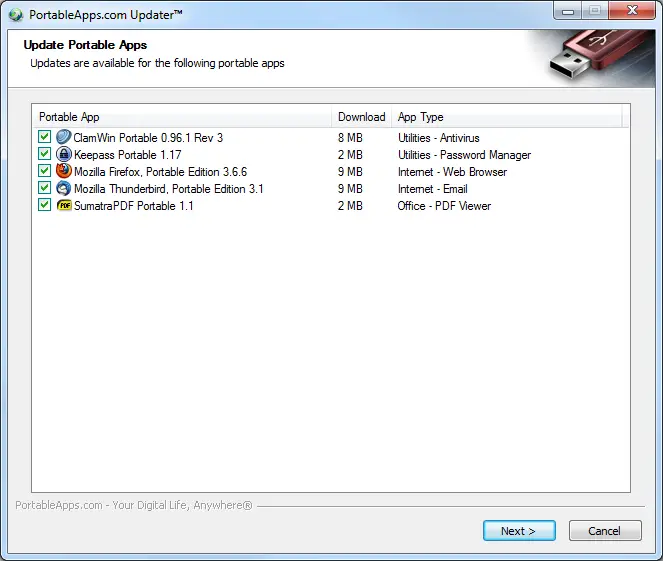
One of the biggest new features is the first public test of the PortableApps.com Updater. The updater can track all your apps and ensure you're running the latest release. It can download and automatically install any apps that are out of date including the PortableApps.com Platform itself. For apps available in multiple language packs (Firefox, Thunderbird, OpenOffice.org, etc) it will download the appropriate language pack based on the language you have the PortableApps.com Platform set to. Just click Manage Apps - Check For Updates! Check out the updater in action (click for larger versions):

New Theming Engine - Multiple Colors and Images, 32 Themes Included
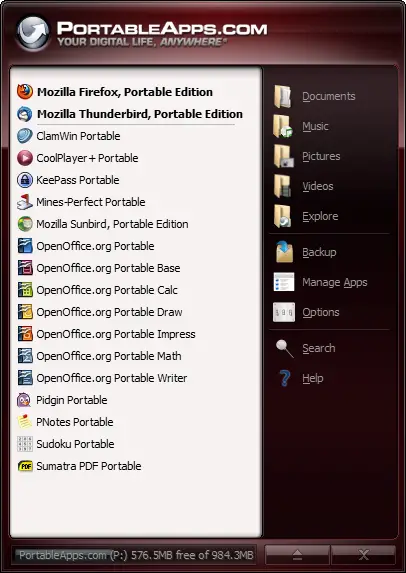
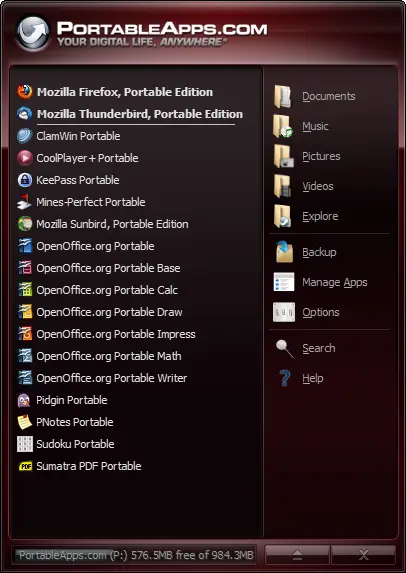
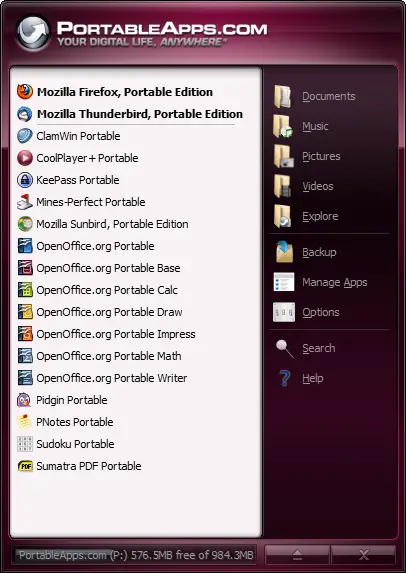
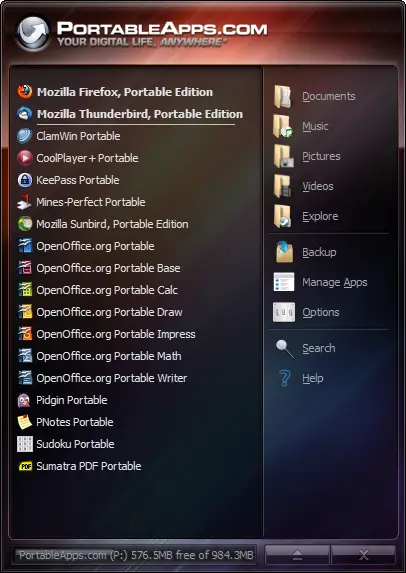
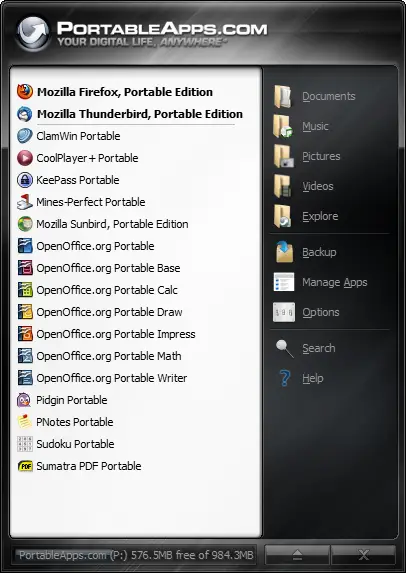
We've also debuted a first look at our new theming engine. The theming engine combines a powerful colormixing system allowing themers and users to easily select a menu look they like. We're still using the old-style theme selector until the Options window debuts in Beta 6, but our two built-in themes (Default White and Dark) are included with 14 colors each as well as a Rainbow and Texture theme in both White and Dark to show what's possible with the new engine. Here are some examples of the new theme sets (click for larger versions):
Full Unicode Support - Use Your Favorite Language On Every PC
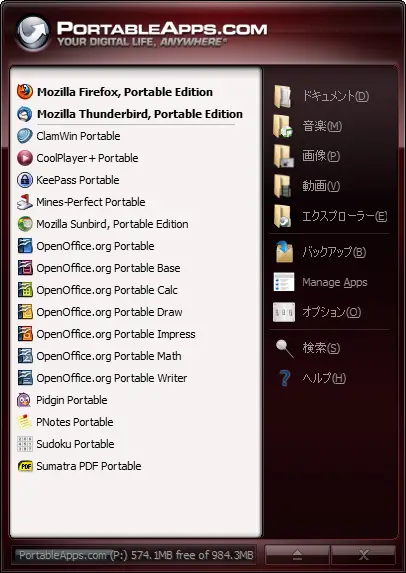
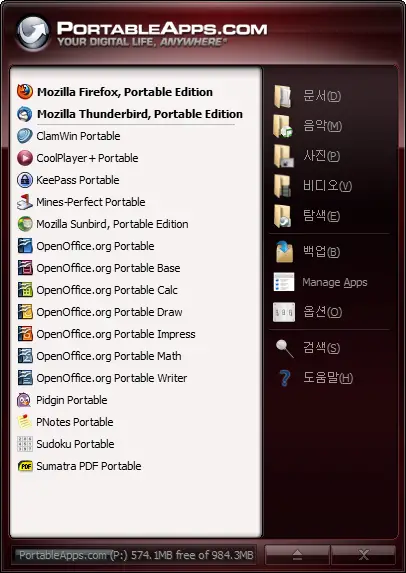
Another big feature we're debuting is full Unicode support. This means we can add support for languages like Serbian and Vietnamese; and that we can support running any language even if it is different from the language Windows is set to. That means that if you like your apps in Japanese, you can set the platform to Japanese even on an English Windows PC. Here are screenshots of the menu running in Japanese, Korean, Arabic and Simplified Chinese, all on a standard Windows 7 English PC (click for larger versions):
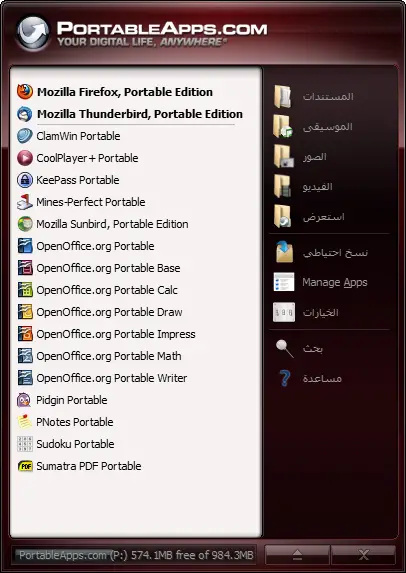
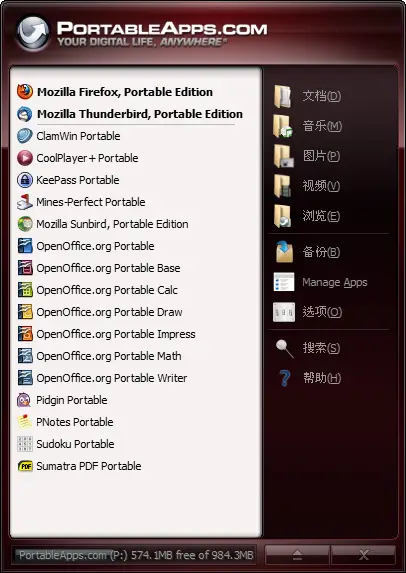
The Road To 2.0
From this point forward, we'll be releasing a new beta every week or two until we hit 2.0 final. Upcoming features include those we announced in the 2.0 Preview including the full theme switcher, improved options screen, file associations, full category/folder support with smart app organization and lots more. Once you're on 2.0 Beta 5, you can just check for new versions and you'll know as soon as Beta 6 is available for you.
Download The Beta Today
You can download the new test version from the PortableApps.com Platform 2.0 Beta 5 forum topic. Get it today!
 - Please help support PortableApps.com's development and hosting

 Visit the Community page
 Join our forums
 Subscribe to our email newsletter
 Subscribe with RSS
 Follow us on BlueSky
 Follow us on Facebook
 Follow us on LinkedIn
 Follow us on Mastodon
Comments
Right!
Finally a Reply that is a real reply to my post... lol
Yes, you're right, I didn't post it but my only concern about my proposal is the bigger footprint the menu will have...
About Lost, I'm sorry, I thought I posted links to this forum only, Lost is just a popup window with an accept button, made by Ryan McCue some time ago (I translated into Spanish and still use it), it's just a reminder "This USB memory belongs to blablabla and if it's found please call blabla or write bla@bla" and the accept button launch what you want, in my case, the memory scanner...
Old MODs based on PortableApps Menu had something like this... In fact I was thinking that in this case, the popup could have a text entry to type a password and launch the menu, if the password is not correct then don't launch... I know is crappy security (since you can explore folders) but it's enough to keep my coworkers/wife/kids away...
Great Job Man
You truthfully have made the longer wait worth it. I no longer have to go through the website every month checking for updates. Thanks a bunch.
One question though: does the updater support updates to the app compactor, app launcher and other development apps installed on the drive?
Yes
The updater can update all regular apps. The app launcher (and bundled generator), app compactor, NSIS, etc are regular apps as well. So they'll all be updated.
Glad you like it
Excellent work
For the longest time, I've followed PortableApps.com and the fantastic apps that are distributed here. I use nearly all of them in my toolkit, but updating has been a pain and I haven't use the PA platform for my menu for a few years. So as soon as I read about this, I downloaded it and installed it along side my other menu, thinking there may be some problems.
1: No interferance. It didn't mess with the other menu program in the slightest.
2: Auto-app detection. It automatically picked out all the portable apps installed.
3: Perfect update. It picked up all the apps needing an update and performed it fairly quick. (Only thing I noticed was a slightly long startup time for the updater app).
Excellent work John, this is the kind of thing that will really make a difference in portability and application tracking. It's made a difference to me...
EDIT: One more thing... If you start the updater, then close the suite, then re-open the suite while it's updating, it loads fbine until you try display it, then it throws a "Stack Overflow" exception...
App designations
I use a .Designator system to identify my apps; eg AppName.C = app compatible with PAc, .OS = Command line based portable app; .J = Java based portable app; .M menu driven (could be .N = not compatable) portable app.
App names
Why call the apps AppName Portable in the PortableApps folder when they are by definition portable; just call them AppName, or at least allow for that posibility in the design of the PAc Platform.
Different
They are different from their normal versions. It's not OpenOffice.org, it's OpenOffice.org Portable, for example. And it is an important distinction because we want people to know it is a different package.
App names ... Feature is already available...
Traversing the Menu
John, would it be difficult to allow a single letter press to jump to the first App beginning with that letter in the menu?
Similar
Something similar is being worked on for an upcoming release.
What new release?
What new release?
PA.c Updater error while updating VLC Media Player
Hi!
I unable to update VLC Media Player to the latest version with PAC Updater because the following happens every time when i make a try:
21096kB (100%) of 21100kB @ 357.5kB/s
It always stops at 21096kB.
and it alert me with the following message:
Download Error: Transfer Error on file
http://downloads.sourceforge.net/portableapps/VLCPortable_1.1.2_Rev_2.pa...
Sincerely, Csabi
PortableApps.com 2.0 Menu with speaking software
Hi all,
I like Portable Apps, it was a really great idea from John.
I would like to ask just about that when could i read the Portable Apps menu with my speaking software? (I am visually impaired).
It needs only a simple text menu i think, for example similar menu that - a menu that QMenu program creates- which is also readable by all speaking software.
The QMenu is available at:
http://arcaneincantations.mvps.org/QMenu.htm
When i right-click a Portable Apps.com Platform icon on the System tray i can only read:
Documents, Pictures, Music, Videos, explore, eject, exit.
Sincerely, Csabi
Updater file error
Hi,
I would like to submit a minor update error that appears not to have been addressed.
The updater is reporting the following error:
Download Error: File Not Found (404) on file http://downloads.sourceforge.net/portableapps/Warzone2100Portable_2.3.1a...
And on the page https://portableapps.com/apps/games/warzone_2100_portable
the file download link is:
http://downloads.sourceforge.net/portableapps/Warzone2100Portable_2.3.1a...
Many thanks for a great piece of software.
Phip.
Fixed
Fixed in the updater database, thanks!
Still not updating....
Hi,
Thanks for the speedy response.
This application is still failing to update, with;
"Download Error: File Not Found (404)"
It seems the .paf part of the filename is missing.
No criticism intended, just trying to help.
Phip
Fixed Now
Sorry about that. It should be fixed now.
Feature request:
Menu request:
Optional:
My feature request has a patent.
joke! XD
[Made vaguely readable by putting in HTML right through - mod Chris]
Armenian language
Someone can say me why in PortableApps.com Platform Setup 2.0 Beta 5 the Armenian is missing???
A few problems...
First off, you should put back the "refresh apps icons" back, without "icons". Because when I put a non-portable app into the portable apps folder, I gotta restart P.A.Platform.
Also, on my sister's XP, most themes have some pink (opacity?) on the transparent corners (on the extreme upper-left & right corners).
So yeah, nothing big but something handy.
Proper place for bugs and
Proper place for bugs and such is https://portableapps.com/node/24258, not this news story
Exit and reload the menu, it will go away. This bug was found and reported here, which is the link included above and where you should check issues. If its new issue that's unreported you should create a post in that thread and report it. If its reported, confirm it with your system details (WinXp\Vista\7).
Thanks.
How do I
How do I get my own themes to work with the new beta? It seems that the Chrome graphics want to overlay on top of everything, each time I switch. How do I stop this?
You Don't
As already stated in Known Issues, existing themes are incompatible with the current beta. Some themes will at least partially work in an upcoming release. But the menu layout has changed so things like the eject and close buttons and the sizebar won't line up in existing themes even once we add support.
Took long enough
Considering that after the integration of the updater into the menu the development of the original updater stopped, I felt like I lost something. Now it's finally back.
Beta 5 - Text is hard to read.
The latest Beta is extremely interesting - it looks like you've incorporated a lot of improvements from the previous release. However I did notice that the text is hard to read on the menu - especially on the dark themes. The older version of PortableApps.com had a more vivid red frame and the text was more white - now the frame is a more washed out shade (it doesn't matter what color theme I choose) and the text is grey (which is REALLY hard to read on the dark theme).
On the other hand I like the update feature in the package (it's been a change I've looked for for some time and I think you have the making of a real winner...)
Keep on working on the product - I think 2.0 will be a significant improvement.
I agree - I posted this in the Beta testing forum
- and have not had any replies yet (linking to it didn't seem to work, so pasted text)
Is anybody else seeing this? Previously the colours matched the colour scheme of the PortableApps.com web site. Now, on my monitor, the menu looks drab and the white letters have gone grey (making the Drive letter and free size difficult to read)
You can change the colors fairly easily...
I didn't like the new colors either--too drab for my taste. But the good news is they're fairly easy to edit. Solanus posted a partial tutorial here: https://portableapps.com/node/24556
The short version--be sure to back things up, etc...
Themes are here:
X:\PortableApps\PortableApps.com\App\DefaultData\Themes
For instance, I went into the Green one
\PortableApps\PortableApps.com\App\DefaultData\Themes\GreenDark
Opened the PATheme.ini file in Notepad.
Changed the HTML code for the Green listing to 188502. (If you want this color in the Green theme as well as GreenDark, you have to edit the PATheme.ini in both folders).
Changed the font codes (for Button Folder menu on RIGHT) and the Drive Space to e5e5e5 which is a lighter, easier to read gray. (See below)
[ButtonFolders]
FontColor=e5e5e5 ;LIGHTGRAY
[DriveSpace]
FontColor=e5e5e5
FontShadowColor=333333
StretchImage=true
[Menu]
Chrome=dark
Background=none
;BackgroundColor=7b0034 ;PINK
;BackgroundColor=550004 ;RED
;BackgroundColor=633100 ;ORANGE
;BackgroundColor=919100 ;YELLOW
BackgroundColor=188502 ;GREEN
;BackgroundColor=021336 ;BLUE
;BackgroundColor=0D276E ;BLUE2
{snip rest}
Under Blue, I changed that default (which is Blue2, not Blue...don't know why the other is there and unused) to a cobalt blue 0000e6. The one that is being used has the ; removed in the given file.
Note that the Rainbow and Textured themes use images so they're a bit more complex.
HTH
Platform - Update Option is Great
Just installed and tried out the new Platform Beta. I love the update option - thought that I had my apps up to date but it updated 23 apps on my flash drive.
The platform worked well with PA on a 16Gb drive and running on a Lenovo X60 laptop with WinXP SP3.
No problem with the firewalls in the office and only one update (Thunderbird I think) "interupted" the automatic update with a "read the Terms and Conditions." Everything seems to be smooth.
windows xp taskbar
hi!
i instaled the new beta, it is very beautiful! but there is two bugs that i didnt find in forum, so i would like to report here...the first one: i cant bring up the PA menu with the keyboard shortcut (win+p) what could happend?
an the second i will show in the following pic...
http://yfrog.com/mmtaskbarj
http://img814.imageshack.us/img814/488/taskbar.jpg
thank you everybody!
sry for my bad english =/
win-alt-space
The keyboard shortcut is now Win-Alt-Space instead. Win-P doesn't work on newer Windows OSes.
The platform appearing in the taskbar is a bug. It'll be fixed in an upcoming beta.
thanks!
thank you Jhon, my fault
you did a great work with the new suite! thank u
Two icons?
Why are there two icons for PA when it is active? There is one on the task bar and one on the systems tray. In the past there have only been one, on the tray. Is there any way you can make this an option to turn the extra icon on or off? It seems redundant.
Update problem
I clicked on "Check for updates" and was told that Mozilla Firefox 3.6.8 was available (as expected). I set the update going, the download completed and I got an error box (as expected) to tell me that FF was running, and to close it to allow the upgrade to complete.
Before I had had a chance to do this, a second box popped up telling me "Software update complete". But of course it hadn't completed because FF was running.
I then closed FF and ran the process again. Once again it told me that 3.6.8 was available and this time the update completed normally.
But of course it started the whole upgrade again - including downloading the 10MB file again. Should the update utility not be aware of whether or not the update has actually completed?
Regards
Nick
Updater doesn't update portable java
One of the app updates today was:
https://portableapps.com/news/2010-07-23-_java_portable_6_update_21
I have java 6.20 installed in e:\PortableApps\CommonFiles\Java
but the updater didn't offer it for update. I claim it should update
common platform files as well.
It did offer to update pidgin, firefox and 7zip though.
Thanks.
-- rouilj
Doesn't Yet
As mentioned in the forum topic on the beta, it doesn't yet support CommonFiles plugins because they're not apps. The ability to automatically update them is coming.
Security
John T. Haller, is it possible to make the PortableApps.com Platform with built-in security system?
There is a program I use on my pendrive that it locks the pendrive when I unplug it from the pc. And everytime I insert my pendrive on my pc, it asks for the password. I'd like to know if there is a chance of you to make a portableapps.com platform that could lock the pendrive or any other storage device when you eject or unnplug it from the pc, and ask for a password just after you plug it on the pc.
Thanks.
Fake Security
Unless your drive itself supports hardware locking, anything that locks the drive is either (1) completely fake security or (2) software encryption that requires admin rights to properly mount the drive or (3) software encryption that can't directly open or run stuff from it's secured part, so it has to copy it to unsecured to work and then back (a slow process) and then will probably leave bits behind in the unsecure location it was copied to.
NTFS security
Hi John, and about NTFS security, when you edit permissions about the drive?
Not Portable
NTFS security isn't portable between machines and can result in you not having access to your files when you need it with no workaround.
I didn't understand. I will
I didn't understand. I will explain how I use it:
first of all, I create a folder inside my USB drive, then I open "my computer" and click with the right button in my device, the I set the permissions to "read and execute", "reading" and "list folders content" (this is how appears in my Portuguese-BR OS, I dont know how its in an English OS) in the tab called security.
So I open the drive and give all permissions to that folder I've created.
this way, the root of my USB drive isnt writeable, but I can store files in my folder. and this worked in every Computer that I've inserted my USB flash.
sry for my bad english, I'm in a hurry in work... but I think you can understand what i mean... thx
Someone asked if Truecrypt was secure
I received an email where someone asked the above question. The answer was given in a TechWorld article about the 12 Russian spies which were deported back to Russia recently. A portionof the article is below:
Have you heard the one about the 21st century Russian spy ring?
TechWorld’s article, FBI crackers fail to crack TrueCrypt, provides a decent overview of the disk encryption situation. The article might be regarded as a review and recommendation for the use of TrueCrypt for your disk encryption needs, offered by the FBI itself, even if that was not an intentional effect of the FBI’s involvement. A single case does not truly prove anything except that, in this one case, those seeking to crack TrueCrypt security failed — but it is certainly an interesting piece of information to consider when selecting disk encryption software, especially on the MS Windows platform where open source disk encryption choices are fewer and farther between than on open source OSs.
The FBI ran into a hurdle it could not overcome in its investigation in the form of
TrueCrypt, an (arguably) open source software disk encryption application available for
MS Windows, Apple MacOS X, and Linux-based systems. Evidently, the primary technique used to try to crack it was a brute force attack on the user’s password, and the
failure of the effort speaks well of the importance of strong passwords. Not only the FBI, but Brazilian counterparts as well, spent months in the attempt.
Testing - Updater - Google chrome invalid
I just downloaded and installed the PA.c Platform Beta 5 and ran the updater straight away. I have 22 programs to update in all (probably all of them).
Computer: Eee PC 1005HA
Operating system: Windows XP SP3
PortableApps drive: SanDisk 16GB flash drive (Came with U3 on it but I removed it)
It seems to be running quite well, except I got an error message saying something like "Google chrome portable installer is invalid and cannot be installed. Please try downloading again". Would it be possible for PA.c Updater to automatically detect this and re-download itself? From memory, I think many Google Chrome Portable installer have had this issue in the past...
Oh it just popped up asking me to agree to Skype's EULA. I ticked the box and clicked next - it hung for a while, but then closed and seems to have carried on installing. That seems to be fine.
Also, I think the PA.c Updater keeps taking focus from my other windows, just briefly. Not that it comes to the front, it just seems to cause my other window to lose focus - e.g. arrow keys will stop scrolling in Adobe Reader until I select the window again. That's a bit annoying.
Okay it's finished and given me a confirmation message. Now I'm going to try running it again... - it says "your portable apps are up to date" - what happened to that invalid Chrome install? I'm confused...
Two other points:
- Can we make the updater more obvious to find? It's a little hidden away.
- Can we make the updater notify us when there are updates? Or does it do that already? I waited a little while when I opened the menu before loading the updater manually, and it didn't pop up with anything...
Hope this is helpful.
Cheers,
Robin.
Google Chrome broken
Okay so I tried to open Google Chrome to see what version it was. It said it could not be opened, and I should download it again. I guess this is the updater's fault. We should fix this issue if possible, so the Updater doesn't leave any programs broken, even if the downloaded installer was invalid. It then thought Google Chrome was up to date. Mistake.
I downloaded and installed Google Chrome Portable manually, and now it seems to work okay.
Issues
Some of these issues are known and listed as "Known Issues" in the main post. Stealing focus, some apps having screens show.
The updater will be automated in an upcoming release to check on launch. This will be optional but enabled by default.
The issue you saw with Chrome was due to Chrome's installer itself having issues, not the updater. An updated versions is propogating to SourceForge's download network now that should hopefully fix it.
The updater will automatically re-download the app if it gets a bad copy because sometimes interruptions happen. The PA.c Installer doing live installs doesn't yet do this but will shortly, which should also alleviate the chrome issue you had.
Turkish translation
I'm testing the Portable applications Platform v2 beta 5 Pre 2 and, there are some omissions and a small error in "Options>Theme" section. I would like to complete the translation of the omissions, and although I have contributed the translation previously, now could not find the correct place in forum.
Thanks.
P.A platform
awesome, new themes, looks. so good.
minimize to tray?
hello, how can i minimize it to tray.
now it is open like normal programms in task-line. i want to have it like the 2.0 Beta2 version
please
Known Issue
See known issues in the main forum topic. It's already a known bug and will be fixed in an upcoming beta.
Brilliant thanks!
I've been using this beta for a couple of weeks now, and it's great. My favourite feature is the new "Check for updates" button. I have come across a couple of issues so far:
1. If an app like Firefox is open when you try to update it then you will get a message telling you to close it so that the installation can proceed. If you close it (then wait for a few seconds to make sure that it has finished closing) and then click on okay, it doesn't get updated. Portable apps just starts installing the next app instead. It doesn't tell you that it hasn't updated it though. It gives the impression that the installation was successful.
2. If you are not using Firefox Portable (for example, if you are using Firefox Portable Beta version, or the Firefox installed on your main computer) and you go to Manage Apps>Get More Apps... then you get the message "Another instance of Firefox is already running. Please close other instanced of Firefox before launching Mozilla Firefox, Portable Edition". It would be nicer if the Portable Apps Platform would first check to see if a Firefox browser is running, and if so, launch the page in that.
Question: Will we be able to configure the final version of the PortableApps Platform 2.0 so that it will automatically check for updates with a specified frequency (daily, weekly, etc.)?
Cheers.
nice!
PA.c Updater is very useful!
but can't minimize to icon on Windows 7 64bit.
nice
realy nice the new platform
but what would be nice is some categorizing or the option to sort the apps
and not only stick some to top via favs
Great work !! :-)
I love the new platform, especially the updater
One small wish - can the portable apps menu please be made re-sizeable???
It's OK on most screens but a bit overwhelming on a small screen.
Dave
PA.c Updater didn't detect that i using Thunderbird Hungarian
Hi!
Really it is not a big problem. The updater updated my thunderbird 3.1.1 Hungarian to the new 3.1.2 English version so it wasn't detect that i using Thunderbird another language than English.
Sincerely, Csabi
Menu Language
The updater will update your apps to whatever language you have your menu set to. If it was set to English when you ran it, you got English TB. To fix it, download and run the Hungarian installer.
I set it to Hungarian since i start to use it
Hi!
The language of my PortableApps menu was already set to Hungarian at the first time when i start to use it.
My PortableAppsMenu.ini contains the following:
[DisplayOptions]
Language=Hungarian
But the updater downloaded the English version of Thunderbird.
Really it is not a big problem, i can download the Hungarian Installer (as You wrote) i only would like to help You to report a bug.
Sincerely, Csabi
Use updater to get new apps
Hey I haven't really kept up on the comments here, so I don't know if this has already been suggested, but it would be really neat to use the updater for the "Get New Apps" option in the menu. All you would have to do is list the apps NOT installed instead of the ones that are. This would seem to be a much more polished and self-contained method of obtaining new apps as opposed to the current open-the-default-browser-to-the-website method.
coming
This is coming in a future release. The code is already done but you'd have to figure out how to use it yourself
I figured it would be. I
I figured it would be. I mean, handling new apps that way just makes so much sense and it's so easy to implement. I may have to take a crack at it and see if I can't figure it out (although I doubt I can do anything since being able to launch the updater in "new app mode" is one thing, while making the menu actually do it from the Get New Apps button would mean I'd need that impossible-to-get-ahold-of compiler that John uses for the Platform
I'll just have to wait like everyone else, content in knowing that this will be coming eventually
Finally the updater has
Finally the updater has become compatible again, thanks!! I use it very much to have my PAs up to date.
One thing that is missing is that we don't received all the list of PAs anymore, that was very helpful when using it in a fresh computer, I would simply select the PAs that I want to install, download them and woila! everything is set up.
ok really good beta looking sweet might i sugest a few teaks
love the app style and loading advanced features locked in and loaded also on the first I would like to see an add diveder option to seperate groups of apps or may a show apps by folder and increase the search depth on sub folder searches for apps so they become easyer to manage other than that i have had no problems with it keep working on it.
running on 8gb flash with about 700 custom and downloaded apps
Slow
Hi all,
I like the V2 but one thing I don't like: the hold-up during initialization.
I understand that at startup it is looking for installed applications. Can't this be faster? Waiting for more than 2 minutes while having 28 apps installed, is too long!
Regards,
Marc Jagt
PortableApps fan
Update Error
Hi John,
i constantly get an error, when i check for updates.
A new update is found "PortableApps.com AppCompactor 2.0.1" and i update it.
It looks like it went smoothly.
But the next time i check for updates it´s there again it will be found over and over.
Beta
If you had the beta or release candidate of 2.0 installed before, it won't correctly remove the old 1.x version which is in a different directory. Just delete the AppCompactor directory in your PortableApps directory.
slow updates
its a hell lot slower than my normal speed
It is useful only if it can grab the speed otherwise normal update would be much better
Slow Installation
There is a known bug in the current installer that causes installation to run a bit slower with the updater (technically not installation itself, but a slower calculation of the installed app's size) but this will be fixed within the next day or so. Downloading is done from the same mirror network of SF mirrors that are normally used. However, if your closest SF mirror is slow and you specify a faster one in your browser, that would be a difference because the updater doesn't known about that selection yet.
Not supported older pathemes
PA.c Platform 2.0 beta 5 not supported older version pathemes. this will be fixed?
Crash
Just tried the new (beta) version; scanned for apps, found things that I manually put in the PortableApps tree that aren't PortableApps programs, seemed okay.
Used the theme feature to inspect various options before settling on blue.
Tried the autoupdater. It found 16 out-of-date apps, prompted me to close (what I believed to be an already up-to-date) Firefox before updating it, did everything then reported some sort of error. (Sorry, I hit OK before noting the details.)
It didn't stop working; however, the icons for the apps were all gone. After hiding everything I didn't want to see, I found the "refresh icons" option. Used it. The launcher then reported that it had run out of resources and crashed. On reload, the icons were put back and the programs I'd chosen to hide stayed hidden but the theme I'd set had reverted to default.
One other comment: my autorun.inf was set to run another launcher entirely. (Pstart.exe. Maybe not everyone's taste but I like being able to cascade menus and group programs, of which I have lots, thematically.) The PortableApps launcher, presumably during installation, had overwritten it with its own version without asking. I don't think I approve.
-- tjp
Font readability
I have used Portable apps for some years and they are absolutely brilliant.
I am not usually a beta tester of programs, but the automatic update facility caught my eye so I had to try it and it worked perfectly and saved me a lot of time. Congratulations on a real step forward in functionality and thanks for your hard work.
However, at the risk of sounding churlish, I find the colour scheme and the font in the right panel of the launcher makes the text hard to read, particularly for those older users amongst us. Compared with the original launcher, the colour schemes look dark, gloomy even, and when combined with the thin white lettering, I find myself squinting to read the text.
Would it be possible to make the fonts a bit thicker, like those in the original, and can we have the original, brighter colours as one of the theme options - apologies not tech savy enough to make my own themes etc?
thanks again
Good point
I think it would be a good idea to allow for a larger font size and bolding, to accommodate people with vision issues.
Meanwhile, Auricle, you can change the font size somewhat under Options.
And I am currently making a few themes; I made one with better visibility and post it here
http://paskins.sourceforge.net/
It's called Old Default Visibility.
It's just the original background from the old menu with a darker right pane. Make sure you set your fonts to larger.
Font readability
Many thanks for your comments solanus. I tried changing font size under options, but although you can make the letters bigger they have the same thickness.
Your new theme however seems to be just the job. I've downloaded it, but where should I put it in the portable apps folders so that it is used by the menu?
There's a built-in installation thing
I would put it in X:\Documents or X:\Documents\Themes first.
Then, to activate it, choose Options>Theme, and you will see that long list of themes, right?
At the bottom of that list is three dots ... Click on that, and it will browse to find a .patheme file. It defaults to browse to the X:\Documents folder. Select the DefaultVisibility.patheme file, and it will automatically install it. You will also notice that the three dots now say ...(Default Visibility)
I know, it's not very intuitive. At the very least, it should say Choose Custom Theme... instead of just three little dots, but that's what we have in this beta.
Font visibility
Got it, that's a big improvement! Thanks for your effort and the clear instrucutions. You've done those of us with poorer eyesight a big service.
Auricle
PS If you ever get the urge just a tiny bit thicker lines on the font wouldn't go amiss, particularly for the white text on the right
That currently can't be controlled using themes
Unfortunately, there is no capability of changing the theme font or font styling, just the color.
This needs to be coded into the exe file, so only John T Haller can add this functionality.
Beta 6 is supposed to have a separate options window to control themes, so maybe it will be in there? Let's hope.
Installation / update
Do I just install this ON TOP of the existing installation (version 1.5.2) or is there an update or upgrade option ?
Install on top
The Update option is, if im right, available since Beta 5 so not in any verion prior to it. You just have to install it on top of the existing installation.
Beta 6 status/timeline
I've been keeping an eye on the site, but not sure what is going on. When Beta 5 was released on July 16, it was said "we'll be releasing a new beta every week or two until we hit 2.0 final".
What is going on? I don't have much time to sift thru the various comments here or on the forums, but there has obviously been some problems. But in light of the huge delay, it would seem the problems have been worse than I thought or far from easy to overcome.
John or anyone else, thanks in advance for the feedback.
In the same way that you don't have much time
In the same way that you don't have much time to sift through this site, the volunteer coders who write the platform, launcher, installer, etc. similarly don't have much free time, and have to not only keep up with the site, but also find extra time to code the apps.
Specifically, in this case, the post that you missed about the schedule was that there isn't going to be a specific release date, but that each beta will be here when it is ready, with the features added that have been completed at that point.
The delay in beta 6 is mainly caused by a couple of subtle misbehaviours in the updater which meant that it didn't handle some error cases well, sometimes deleting the current version when it was unable to download the new one, and such like. These, and some issues with storage locations for temporary downloaded files, have meant that the entire PortableApps installer has had to have its design and spec adjusted, tested, re-released, and a number of the apps may have to be re-released in the updated installer form, in order to allow the "bug" in the updater to be properly resolved.
Sometimes the simplest of problems can have staggeringly long-winded solutions.
It will be done when it is done, which will hopefully be soon
All Apps
Correct. One change, "a number of the apps may have to be re-released", should read "all apps have to be re-released".
Thank you for the feedback/update
Jimbo and John, thank you for taking a minute to help clear up the status of things.
Platform 2.0 beta 5
It is great to see the update of PortableApps Platform 2.0 beta5, I've just download and using it right now, thanks for people who made great application to keep life easier than ever :). BTW, I wanted to feedback and suggest somethings I think we can make the PortableApps more better.
-) Good things:
+ Update application: it is great and special feature I have looking for a long time. But I think it will be faster performance and decrease network bandwidth to download update by using update package like patch method.
==> Solutions: We'll make a change list for old & new version of app then package only difference things between versions.
+ Great new theme engine and nice bundled default theme fit many people favorite
-) Missing things:
+ Quick search bar on the top to allow user search app quickly.
==> Solutions: cache the application list to make faster access for search and app list display. We can use sqlite or any embed database to store things then we can search through, update, sort .... easily
+ Scollbar: I have install and convert many applications to use with PortableApp but now it become very hard and is pain to search any application because of the currently scroll method (using 2 button to scroll up & down) is too too slow and make my eyes tired to looking for something.
==> Solutions: Provide settings to make scrollbar visible on the app listing. It can be a normal scroll as native container or advanced bar like some Mac OS X scrollbar, also it should have a alphabetical list of the application to get more quickly to focus the the first letter of applications.
if you need any help or more detail, pls contact with me at: tiger2wander [at] gmail [dot] com
---
Best regard!
Uoc Nguyen
I sure hope PortableApps
I sure hope PortableApps isn't dead, it's been a while since anything's been updated really, two weeks? I didn't count.
Need help?
Is there a problem with this? It's been ages since the beta 5 was released. If you need new developers to help out, say so. There might be more people out there willing to help than you'd think.
Bug : makes desktop icons disappear
(Hi, I hope it's the right place to report a bug, I couln't find another place)
So, when i launch the portableapps manager, all of my desktop icons disappear. When i close it, the icons come back.
Set the option
You've set it to hide desktop icons, then. It won't do it by itself, it's a setting which you chose at some point.
true,
i just found this option, i must have activated by error ; thanks !
Can you do something about the updater?
The updater is not stable.
Today I tried to update 6 applications. 3 of them ended up with "invalid".
Being: Clamwin, Thunderbird and Firefox.
This is not the first time. Too many update actions fail.
More Info
Can you provide some more info? I just updated ClamWin, TB and FF (English packages for the last two) and all 3 updated without issue. What path are you running from? What operating system? What language do you have the menu set to?
Concerning the updater
Today I've tried a new attempt.
Results:
Clamwin, Firefox, Infrarecorder, Lightscreen, PNotes, Speedcrunch, Thunderbird, Utorrent, VLC Player all fail with "invalid".
Database Browser does download the installer and then fails with "error occured while attempting to update".
I'm sorry this means 10 fails out of 10 attempts. I'm done with this and uninstalled the Platform. The Platform is just useless for me and there are much better alternatives.
To answer your previous questions:
I'm just running plain Windows 7 32-bit. Nothing special. Language is Dutch and the path is no different than that what is advised during install.
Plain manual download of the files just works.
Updater Issues
I had a couple of "invalid" updates until I realized that the apps were running during the update... once I shut all the apps down (except the PAc Platform) I have been able to update as many as 9 apps at a time... (Win 7 32-bit, i5-430M Processor, 4GB Ram)
Theming Question...
Hi John!
I have made my own theme in version 1.6.1 of the menu and I was wondering if I could use it in version 2 when it is released.
Thanks in advance for any help
Dan43.
Pages