
 your computer, without the computer™

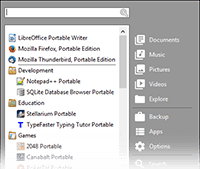
The PortableApps.com Platform™ is a full-featured portable software system that ties all your portable apps together and lets you build your own custom portable app suite for use in your synced cloud folder, on your local PC, or on a portable USB drive. And it's kept separate from your local apps. Also available on macOS.
Awesome Features: Complete App Store | App Organization
Automatic Software Updates | Themes and Customization
Portable Fonts | Integrated Backup and Restore | And More!
The PortableApps.com Platform is 100% Free. Free to use. Free to share. And fully open source.
Please read a personal appeal from PortableApps.com founder John T. Haller and donate today.


Download from PortableApps.com
Version 29.5.3 for Windows, 83 Languages
6MB download / 17MB installed
Help Translate | Antivirus Scan | Download Details
Additional Download Mirror: SourceForge
Having difficulty upgrading? You can manually update to fix things
Download Details


- Operating Systems: Windows 11, 10, 8.1, 8, 7, Vista, XP
- Also Works With: Linux, Unix, BSD, etc via Wine & Mac OS X via CrossOver, Wineskin, WineBottler, PlayOnMac
- 32-bit and 64-bit Support: Automatically adjusts support and performance to each PC
- Publisher: PortableApps.com
- Date Updated: 2024-06-27 (Platform Changelog)
- License: Free / Open Source (GPL, some MIT, some CC images, trademarks and trade dress not included)
- Source Code: PortableApps.com Platform (Menu, App Store, etc)
- SHA256 Hash: b6fb17e3b8dae7036ad95fe90608cf3a673973d3342f42311586672790328a27
Support
Got a support question? Check out the PortableApps.com Platform Support page and the dedicated support forum.
 Visit the Community page
 Join our forums
 Subscribe to our email newsletter
 Subscribe with RSS
 Follow us on Facebook
 Follow us on LinkedIn
 Follow us on Twitter
 Follow us on Mastodon
 Follow us on BlueSky