

process explorer, killer and debugger

Download from PortableApps.com
Version 2.04 for Windows, Multilingual
6MB download / 21MB installed
Antivirus Scan | Details
Runs anywhere (cloud, removable, local) without 'installing'. Use the PortableApps.com Platform for easy installs and automatic updates.
 - Support PortableApps.com development & hosting, - Support Daphne development
Description
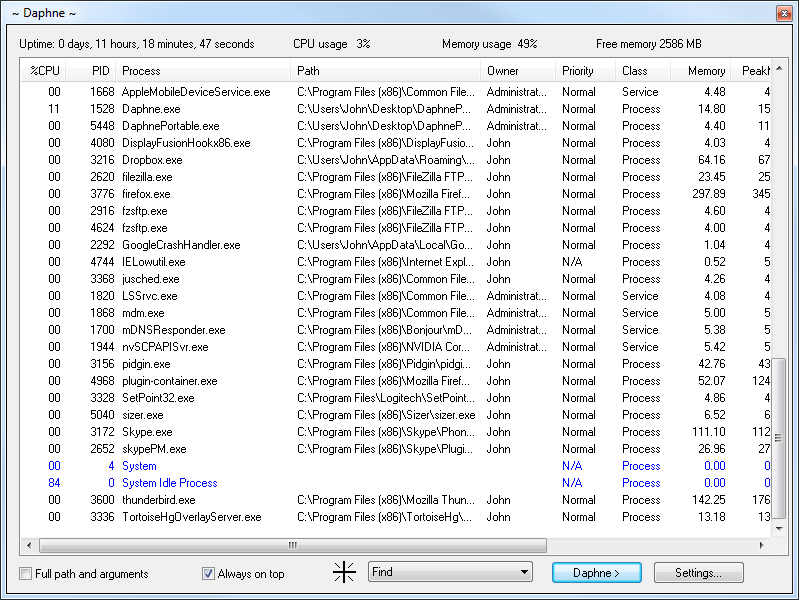
You can kill a process by dragging the mouse over the windows, by right-clicking the process in the main process list, or by typing its name with the "Kill all by name" command. You can set a any window to be always on top, to be transparent, to be enable, et cetera. Although Daphne was born just to kill windows process. You can think of Daphne as a task manager replacement. The main window displays a list of currently running process with detailed information about: CPU usage, Process ID, Process name, Full path (and arguments), Priority, Class (Process / Service), Current memory usage, Peek memory usage, Current swap usage, Peek swap usage and Number of threads. Both the 32-bit and 64-bit versions are contained and automatically switched between.
Download Details

- Publisher: Leandro Fernández & PortableApps.com
- Date Updated: 2014-09-28
- Date Added: 2011-01-01
- System Requirements: Windows XP, Vista, 7, 8, 10, 11
- App License: Open Source (GPL)
- Source: Daphne, PortableApps.com Launcher, PortableApps.com Installer
- SHA256 Hash: ab86c762e07cd3bd5a41926ee35d4bdfd97c0c2607e713573081fd34aa2fafa9
 Visit the Community page
 Join our forums
 Subscribe to our email newsletter
 Subscribe with RSS
 Follow us on BlueSky
 Follow us on Facebook
 Follow us on LinkedIn
 Follow us on Mastodon